Running a busy e-commerce store isn’t just about marketing photos and online success stories. Most days, you’re dealing with a lot of incoming orders, chasing down couriers, fielding client requests for reports, and somewhere in that mess, still manually building dispatch lists or pasting invoice links into WhatsApp chats. Honestly, that routine should’ve faded out years ago.
WebPlanex Invoices quietly stands out among invoicing tools for Shopify and WooCommerce. It doesn’t scream for attention, but it keeps rolling out updates that actually make life easier. The latest one landed with three new features: Logistic Manifest, Report Center, and WhatsApp Integration. Each of these hits a pain point B2B teams and agency owners know too well and have had to patch over with extra effort.
Let’s see what each new feature does.
Logistic Manifest: Finally, No More Dispatch Spreadsheets
If you’re shipping anywhere from 50 to 500 orders a day, you get it, there’s always a rush to put together a manifest for the courier. Someone on your ops team ends up counting packages, double-checking weights, adding tracking numbers, and sorting out pickup details. It’s boring, easy to mess up, and a single typo can stall the whole shipment, just because you couldn’t choose what’s better? Manual or Automated invoicing.
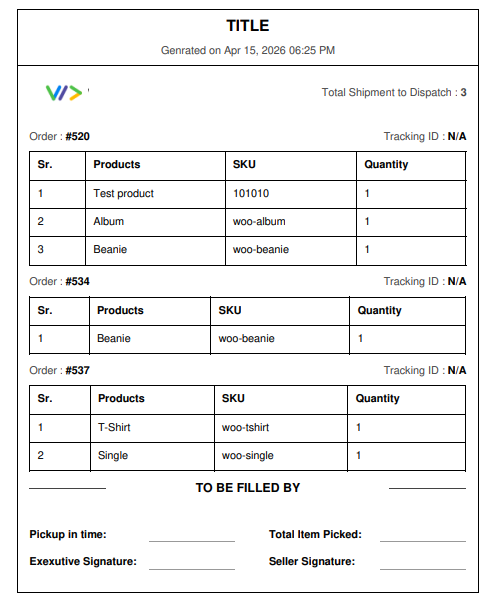
WebPlanex Invoices changes all that with its Logistic Manifest feature. Whenever you process a batch of orders, it just spits out a manifest straight from your live order data, ready for your logistics provider. There’s no manual copy-paste, no juggling spreadsheets.
If you’re in B2B and sending out bulk packages, this really makes a difference. You actually save time, and your paperwork matches up, which cuts down on ugly arguments with couriers over mistakes.
What works well:
- Pulls directly from order data, so there's no duplication of effort
- Cuts out a manual step that was easy to get wrong under pressure
- Works with most major logistics providers out of the box
- The document is ready to share or print without any reformatting
Report Center: Actual Visibility Into Your Invoicing Data
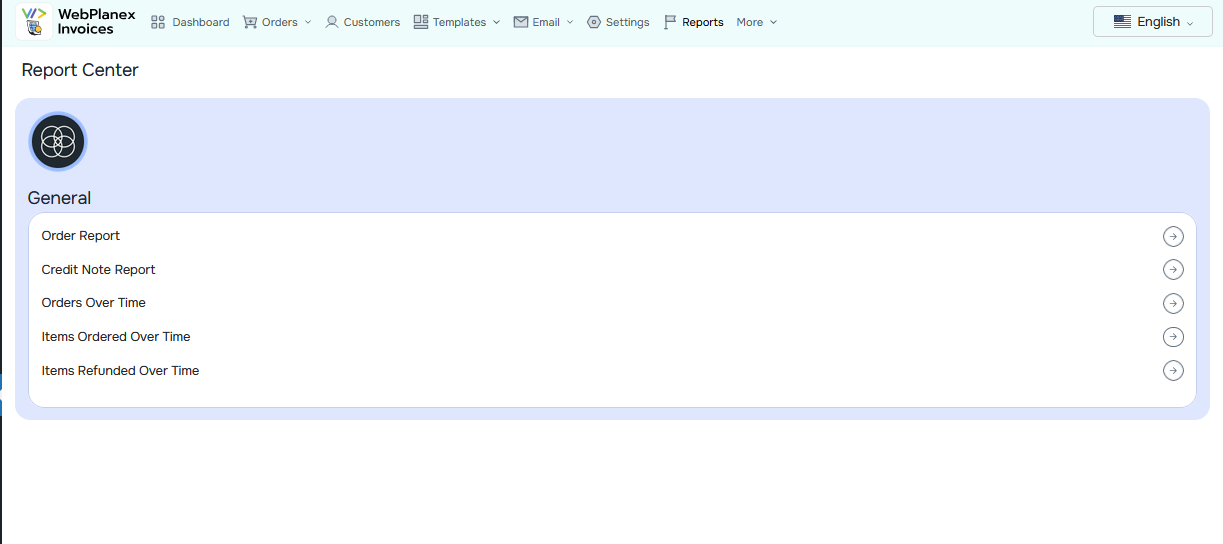
Most invoicing tools give you data. What they don't always give you is a fast, filterable way to actually use that data. The Report Center in WebPlanex Invoices is the answer to that.
It's a centralized hub where you can pull invoicing reports filtered by date range, customer, product category, or status. You can use report centre for order and credit note reports, specially for agency owners managing invoicing across multiple client stores, this is particularly valuable. Generating a client-specific revenue breakdown or a tax summary for a specific period used to mean exporting raw data and cleaning it up manually. Now it's a few filters and a download.
The report types available include sales summaries, tax breakdowns by region, pending invoice tracking, and customer-level reports that help you identify your top buyers and flag accounts that consistently pay late.
What works well:
- Exports to both PDF and CSV, which covers most use cases (client reporting, accounting handoffs, internal reviews)
- The filters are genuinely flexible and fast
- For accountants and finance teams, the tax report format is clean and usable as-is
- Saves a meaningful amount of time at month-end when reporting is due
WhatsApp Integration: Invoices Where Your Customers Actually Read Them
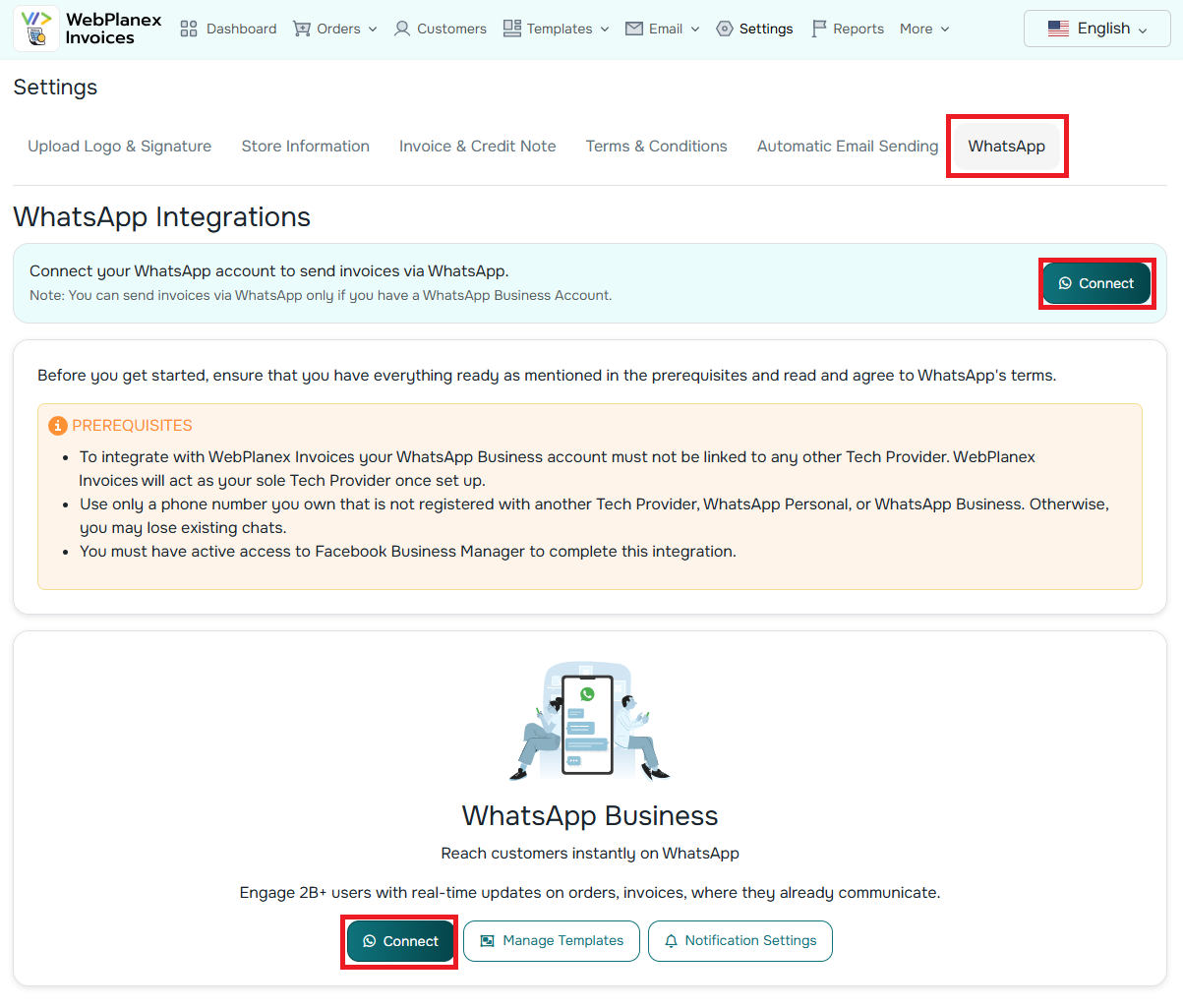
Email open rates for transactional messages are around 20 to 30 percent on a good day. WhatsApp sits closer to 98 percent. That gap really makes a difference when you need to get invoices in front of buyers fast and speed up payments. With WebPlanex Invoices, the WhatsApp integration lets you fire off invoices, order confirmations, and payment reminders straight to customers right inside WhatsApp. No third-party tools, no more copy-pasting messages. Just set up your triggers, like “send invoice when the order is fulfilled” or “remind them three days before the invoice is due,” and the system just does it for you.
For B2B sales teams dealing with clients in India and Southeast Asia, where WhatsApp is honestly how business gets done, this cuts out a lot of hassle.
Invoices go out faster, get seen faster, and getting paid faster tends to follow.
A step-by-step guide for WhatsApp Integration
What works well:
- Supports sending actual PDF invoices inside the chat, not just a link
- Runs in parallel with email delivery, so you're not replacing one channel with another
- Dynamic message templates mean the message feels personal without requiring manual input
- Reduces the repeated "can you resend that invoice?" because the customer has it right in their chat history
Our Take
These three features are practical additions, not flashy ones. The Logistic Manifest solves a real daily headache for ops teams. The Report Center gives agency owners and finance teams something they've needed for a while. And the WhatsApp Integration closes the gap between sending an invoice and actually getting it seen.
None of them is perfect yet. Multi-warehouse support, custom report templates, and higher WhatsApp messaging limits would make each feature significantly stronger. But as a first release, they're built around feedback from people who actually use the product, and it shows.
If you're a B2B team running high-volume dispatches, upgrade for the Manifest. If you're an agency, upgrade to the Report Center. If collecting payment faster matters to your business (it should), the WhatsApp Integration is worth the setup time.
Frequently Asked Questions
Do I need a separate WhatsApp Business account to use the WhatsApp Integration?
Yes. You'll need a WhatsApp Business API account approved by Meta. Once you have that, connecting it inside WebPlanex Invoices is straightforward and typically takes under 30 minutes. The Meta approval process itself usually runs one to three business days.
How current is the data in the Report Center?
It syncs in near real-time with your order and invoice data. For very high-volume stores there can be a small delay of a few minutes, but for most merchants, the reports reflect what's actually happening in your pipeline as of right now.
Can agencies pull separate reports for each client store?
Yes. The Report Center supports filtering by store, so if you're on the Agency plan, you can generate isolated reports per client. This makes monthly billing reviews and tax filing prep considerably less painful.
Are these new features available on the free Starter plan?
The Logistic Manifest and core Report Center functionality are part of select paid plans. WhatsApp Integration is exclusive to the Pro and Agency tiers. The WebPlanex Invoices features page has a full plan comparison if you want to see exactly what's included at each level.