If you’ve ever tried to clean up the invoices coming out of WooCommerce or Shopify, you already know the struggle. The default templates feel a bit… rushed. They get the job done, sure, but they’re not exactly something you’d want clients to judge your brand by.
I’ve spoken with enough store owners to know what usually happens:
Someone downloads a “free” invoice plugin, prints out a test invoice, and immediately goes, “Why does this look like a spreadsheet from 2002?”
That’s where
good invoice templates really matter, templates that don’t just look pretty, but also make business easier. And after playing around with different options, it’s clear that Webplanex Invoices takes a very different approach.
Before I get into how they deliver their templates, let’s talk about what makes a template actually
good in the first place and so that you can find the
best WooCommerce invoices.
What Makes a Great Invoice Template?
Store owners often assume templates are just design files. The truth is, a good invoice needs to balance four things:
1. Clarity
The customer shouldn’t have to squint to find item totals, tax details, shipping costs, or payment instructions. Clean spacing, good hierarchy, and simple typography fix half your problems before you even begin.
2. Branding
Your invoice is one of the few documents customers actually save. If it’s generic, you look generic.
Think of them like outlines. Your job is to shape them into something that feels right for your store.
A good template lets you control:
- logo placement
- brand colors
- header/footer layout
- typography
- business info
You shouldn’t need Photoshop for this. It should just… work.
3. Compliance
Depending on where your store operates, you may need invoice numbers or special tax formats. These aren’t “nice to have.” They’re non-negotiable.
4. A Layout That Works for Your Products
A store selling ten-dollar accessories needs a different invoice layout than a store shipping industrial parts across borders.
So when people ask, “Which invoice template is best?”
There’s no single answer. It depends on the business.
But Webplanex Invoices handles this surprisingly well.
Best Invoice Templates for WooCommerce/Shopify (Real Use Cases)
1. Standard Template
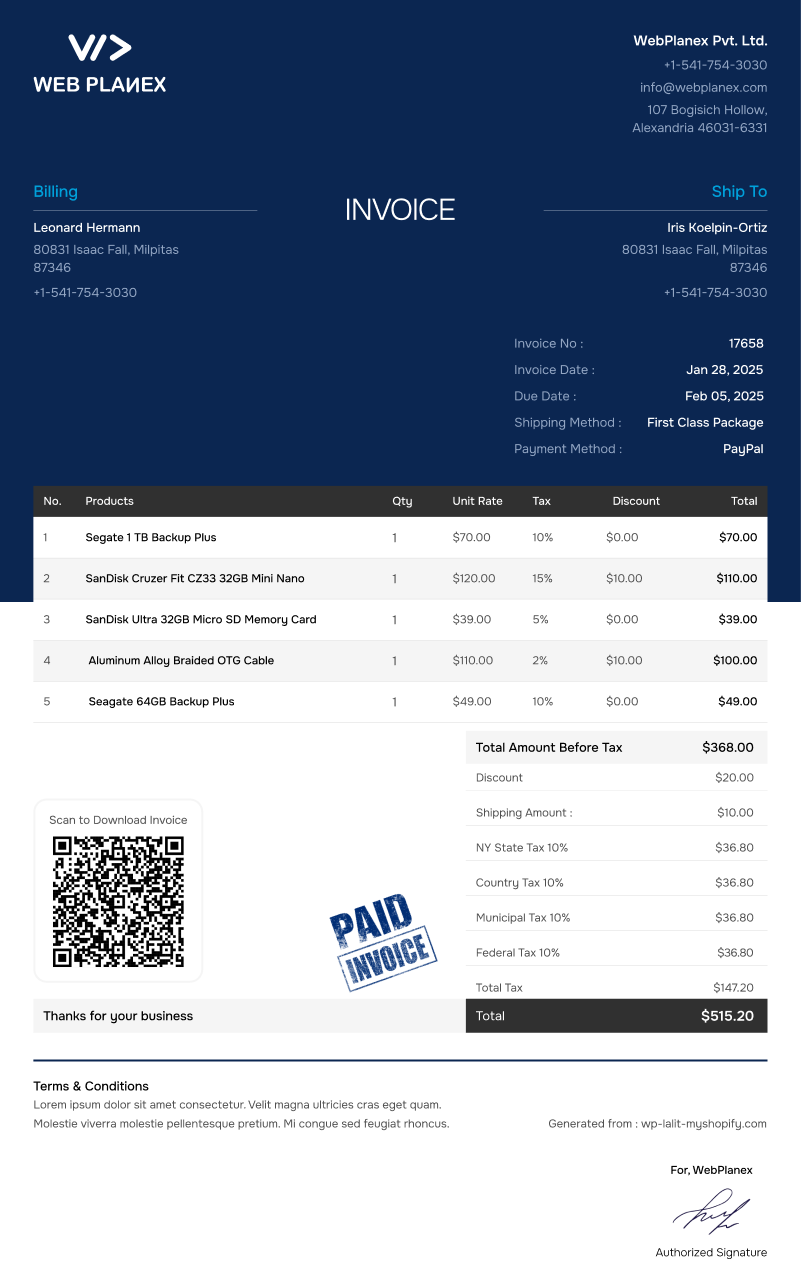
Purpose: General invoices for everyday orders.
Go for this option if you just want something straightforward that works. No frills, just reliable. It’s a great fit for retailers, small online stores, or anyone taking their first steps with Shopify or WooCommerce.
Who’s it for?: Retailers, small online shops, and beginners on Shopify or WooCommerce.
Why choose it?: The uncluttered design makes everything easy, quick prints, simple steps, nothing to slow you down.
2. Blue White Template
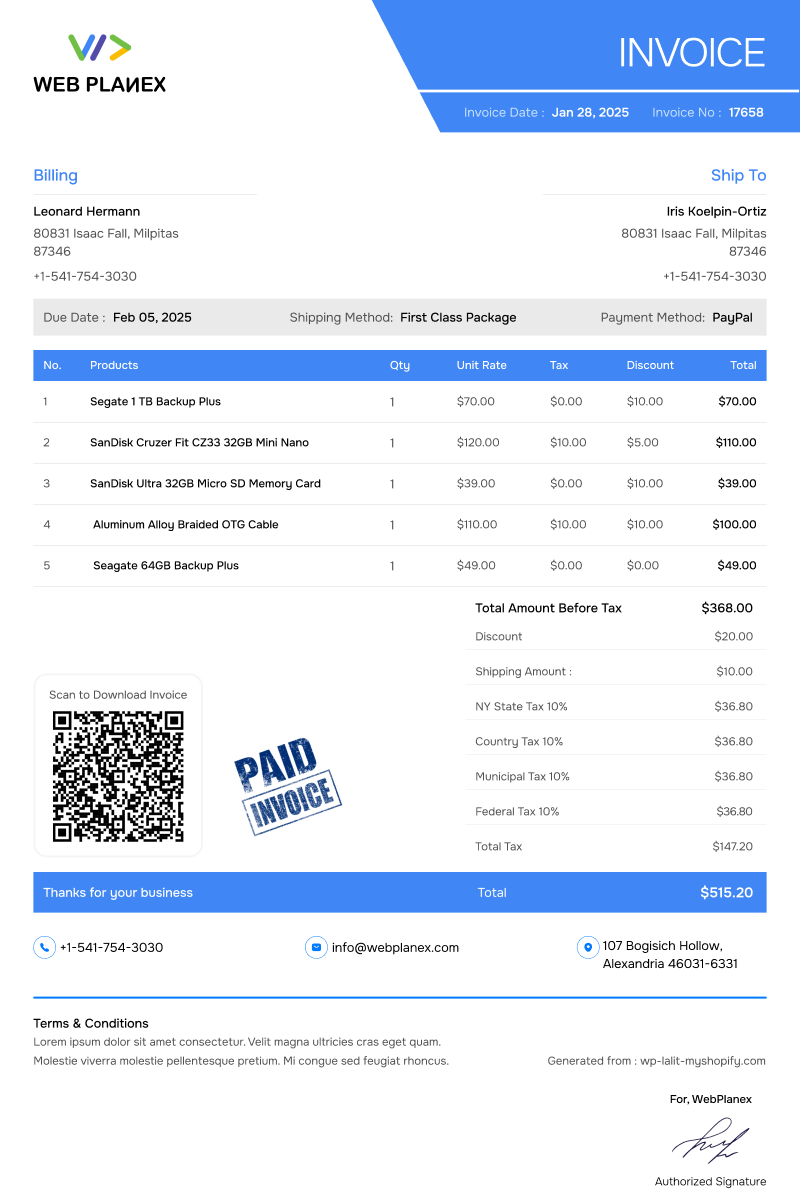
Purpose: Professional-looking invoices with a modern color fusion.
If you’re after an invoice that looks sharp and modern, this one’s a great pick. The color scheme adds a lively touch, but everything stays easy to read
Best for: It really fits fashion, beauty, and lifestyle brands.
Why it works: You can spot the important stuff, like totals and taxes, at a glance. Nothing slips by.
3. Brown Template
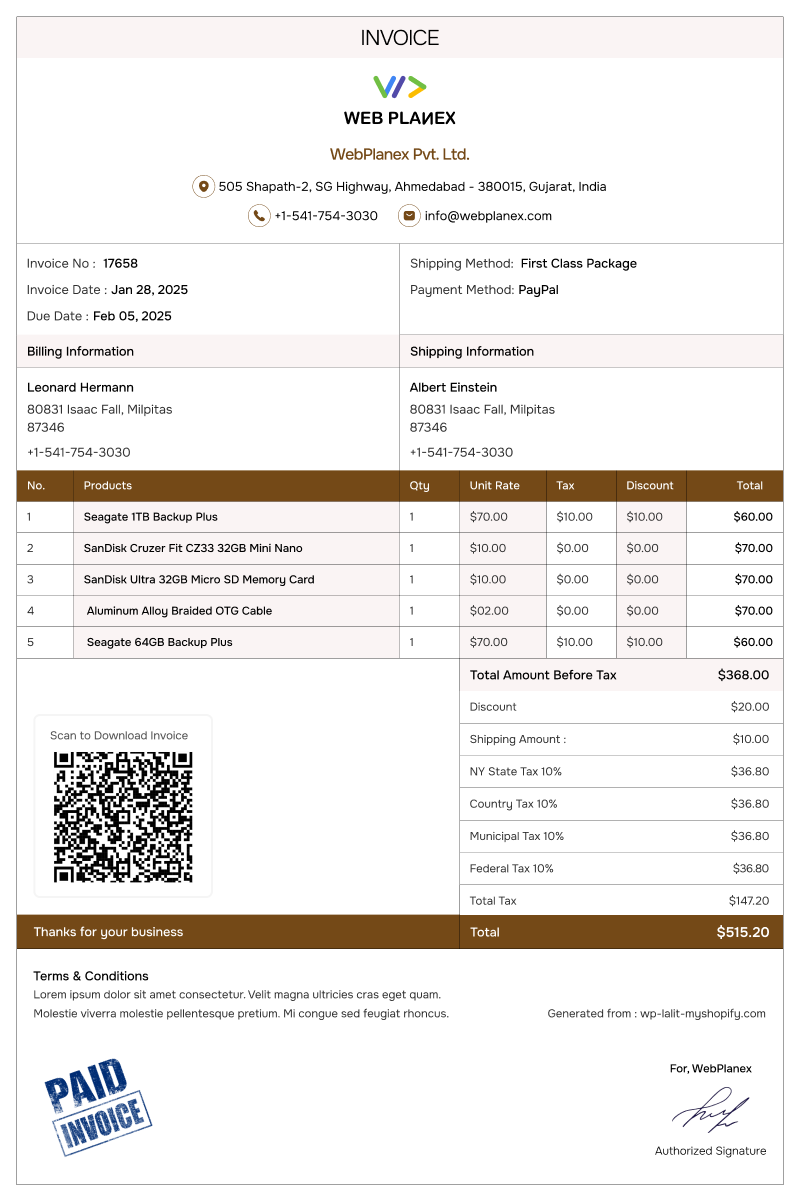
Purpose: Branded invoices with a warm and sophisticated design.
If you’re looking for something with grace, Brown Template brings that understated and premium feel. The muted colors and sharp layout give your invoices a perfect look.
Perfect for: Handcrafted products and goods, boutiques, or lifestyle shops.
Why choose it?: The strong visuals help build trust and make your brand feel valuable.
4. Purple Template
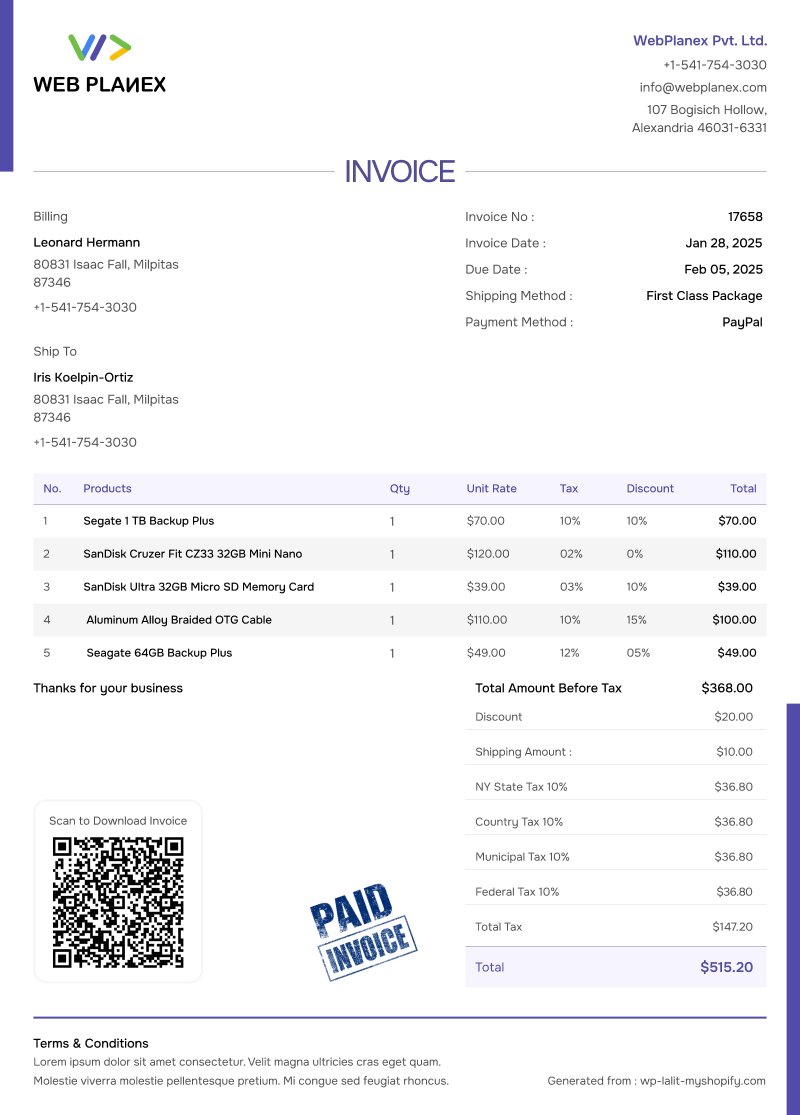
Purpose: Bold and branded invoices with a focus on design.
Want your invoices to actually get noticed? The Purple Template pops with bold colors and simple, readable sections. It’s the kind of invoice people remember, not just another piece of paper they toss aside.
Who’s it for?: Creative businesses, digital products, subscription services—pretty much anyone with a focus and some flair.
Why it works: It makes your brand pop and keeps your billing clear and organized.
5. Template Blue
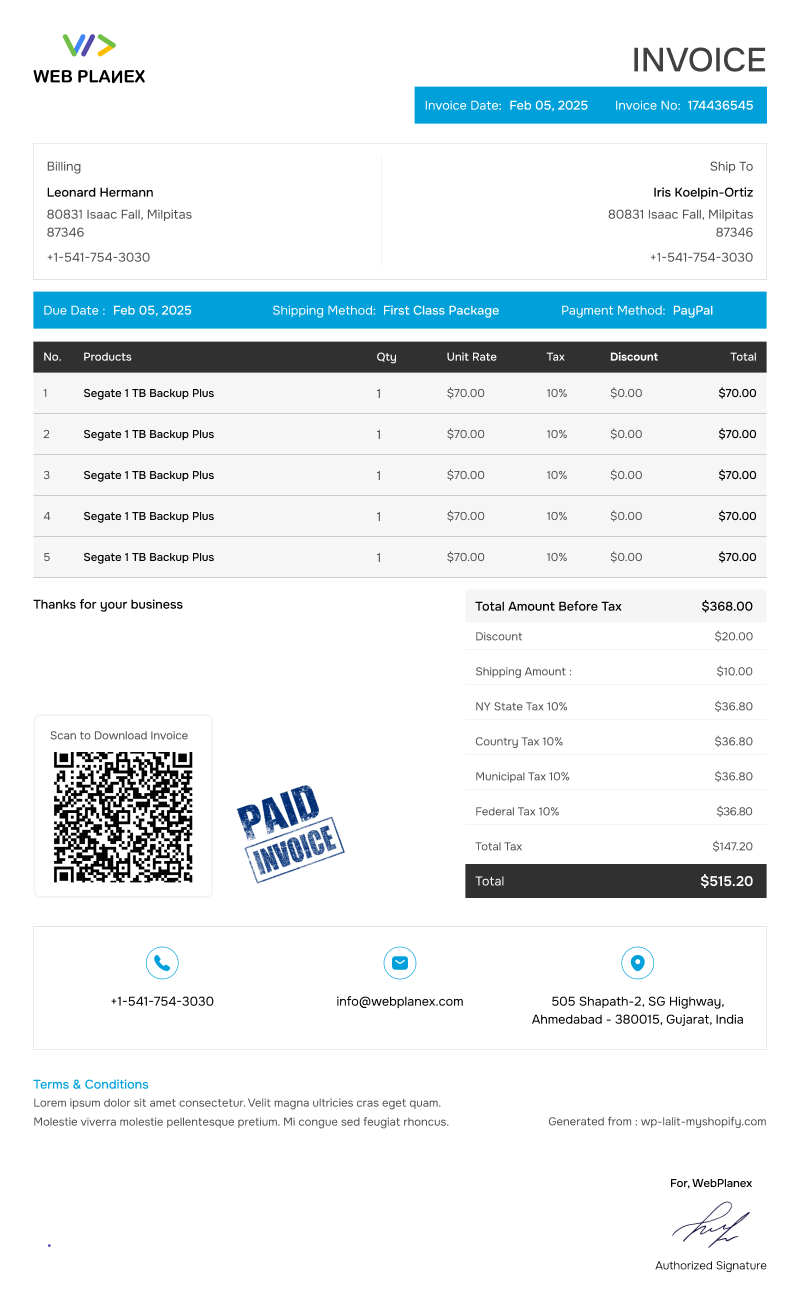
Purpose: Corporate-style invoices for international or B2B sales.
If you’re handling international or B2B sales, Template Blue is your guy. It packs in all the detail you need, without turning messy.
Who’s it for?: Exporters, wholesalers, and any shop selling across borders.
Why use it?: You get clarity and compliance in one shot, which makes accounting way easier.
Best Templates — When to Use What
Depending on your store’s size, product type, customer base, and what kind of documents you send (invoice, slip, label), certain templates simply match better. Here are common use‑cases with template suggestions.
| Use-Case / Business Type |
Suggested Template(s) |
Why It Fits |
| Standard retail store (apparel, accessories, small items) |
Standard, Blue White Template, Template Blue |
Clean layout, simple branding — easy to read for customers, ideal for printing or PDF. |
| International / Multi‑tax or multi‑currency stores |
Template Blue, Standard (with template customizer) |
Supports tax fields & multi‑currency; customer sees all details clearly. |
| Customer‑facing stores need strong branding |
Brown, Purple Template, Blue White Template |
Branded color + logo space — makes invoice feel part of store identity. |
| Stores with frequent repeats / simple orders |
Standard, Blue White Template |
Minimal overhead, straightforward invoice — reduces clutter. |
| Warehouse or logistics-heavy stores (packing slips) |
Packing Slips 1–6 (any clean slip template) |
No price listed, just product & shipping info — ideal for fulfillment. |
| Stores shipping bulky/multiple items need packing instructions |
Packing Slips 2 or 4 (choose based on layout) |
A clear product & SKU list helps warehouse staff pick & pack accurately. |
| Brands shipping globally need shipping labels |
Shipping Label 1–5 |
Designed for courier/shipping info, saves time on manual label prep. |
| Stores sending delivery notes (mixed orders, bundles) |
Delivery Notes 1–5 |
Flexible format accommodating bundles, additional notes, or multi‑item shipments. |
So… How Does Webplanex Deliver These Templates So Well?
Plenty of plugins promise customization, but Webplanex does something I wish more plugins did: it avoids overwhelming you. Everything inside the editor feels like it was built for real merchants, not developers.
Here’s what stands out.
1. A Visual Editor That Doesn’t Require Coding
- brand colors
- fonts
- borders
- section order
- data fields
- alignment
- spacing
- logo sizing
Most changes take seconds, and the preview updates instantly, like editing a Canva layout, but for invoices.
2. Auto-Generated Data Fields
You just toggle on/off the fields you want:
- tax type
- invoice prefix
- order number
- payment method
- customer notes
- SKU
- discount
- shipping address
Everything pulls directly from Shopify or WooCommerce data. You don’t manually enter anything.
3. Multiple Templates You Can Switch Between Anytime
3. Multiple Templates You Can Switch Between Anytime
Some stores use:
- a “simple” invoice for everyday orders
- a “detailed” invoice for B2B
- a “tax invoice” for international shipments
Webplanex lets you save multiple templates and switch them depending on the order type.
4. Automatic PDF Attachments in Customer Emails
This is the part customers actually notice.
Whenever an order is placed, Webplanex automatically attaches the invoice PDF to order emails, no manual work, no forgetting, no exporting files one by one.
It feels like one of those features you don’t truly appreciate until you’ve lived without it.
5. Works for Both Shopify and WooCommerce
A rare advantage:
If you ever switch platforms or run multiple stores, your invoice setup stays consistent. You don’t have to reinvent templates from scratch on each store.
Why Good Templates Matter More Than Most People Think
Invoices may not be the “fun” part of running a store, but they show up at almost every important moment:
- When customers first receive an order confirmation
- When accounting teams reconcile payments
- When shipments cross borders
- When wholesalers reorder
A messy invoice makes a business feel amateur.
A clean, branded one makes your store feel established.
Webplanex Invoices doesn’t just give you templates, it gives you control over how your business presents itself at a very practical level.
Conclusion
If you’ve been dealing with plain or outdated invoices, upgrading your templates is one of those small improvements that quietly make everything feel more polished. Customers notice it. Your team notices it. And frankly, it saves more time than most people expect.
People notice. Your team notices. Honestly, it saves more time than you’d think. Webplanex Invoices hands you templates that actually look sharp, fit how you work, and skip all the messy coding or tricky setup. Whether you use WooCommerce or Shopify, you get a strong starting point and the freedom to tweak things until they’re just right.