If you’ve been running an online store for any amount of time, you know that customer communication can become chaotic very quickly. A customer places an order, then wants a copy of their invoice… someone else needs a
GST-friendly PDF… another customer wants an invoice re-sent because the first email got buried. Multiply that across 20, 100, or 1,000 orders a day, and things can get overwhelming.
That’s exactly the kind of mess merchants wanted to avoid when they switched to
Webplanex PDF Invoices and Packing Slips for WooCommerce, a tool built to automate all those “micro tasks” that eat up your time but don’t really need human attention.
One feature you’ll end up loving is Auto-Email Invoices. It doesn’t sound flashy. Honestly, it’s about as straightforward as it gets, but it changes everything. Suddenly, customers trust you more, your support team isn’t buried in requests, and the whole buying process just feels better for everyone.
In this guide, let’s break down how to set it up and why it can instantly make your communication smoother and more professional.
Why Auto-Email Invoices Matter More Than You Think
Invoices don’t look exciting on the surface. They’re not a flashy banner or a product video. But customers rely on them more than most merchants realize.
Here’s what a well-timed invoice email does:
1. It reassures the customer right after purchase
A clear, branded invoice acts like a confirmation that everything went through correctly. Customers feel secure knowing that every detail is recorded properly.
2. It reduces unnecessary support tickets
Most “Can you send my invoice?” messages are avoidable.
When invoices go out automatically, customers don’t have to chase you.
3. It gives your brand a more premium, organized feel
A clean invoice that arrives instantly shows professionalism, something customers remember much more than we think.
4. It speeds up B2B and tax claims
If you sell to business buyers, you already know how strict they are about invoices. Auto-emails make sure they get what they need, on time, every time.
How Auto-Emailing Works Inside Webplanex Invoices
This system runs quietly behind the scenes. No tricky setup, just smooth operation. As soon as someone places an order or the status changes, the app whips up a PDF invoice on its own, your logo, your colors, tax info, all the details you’ve set up. If you want, it fires that PDF straight to the customer right away.
You can decide:
- When the invoice should be emailed
- Which template it should use
- Whether packing slips or credit notes should also be included
- Which order statuses should trigger an email
Once set, the entire workflow runs on autopilot.
Let’s Set It Up: A Simple Walkthrough
You don’t need technical knowledge to activate anything.
Here’s the simplest version of the process merchants follow:
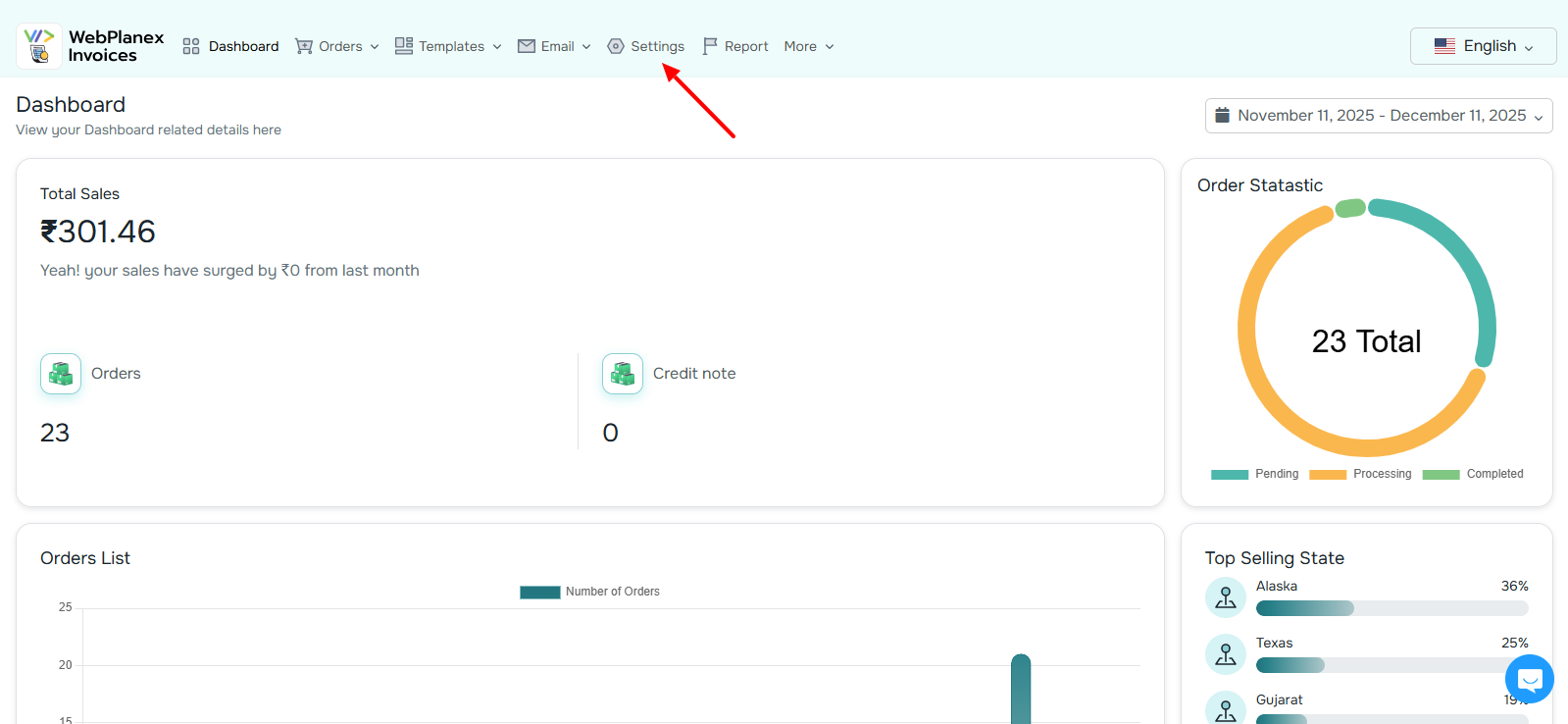
Step 1: Open Your Webplanex Invoices Dashboard
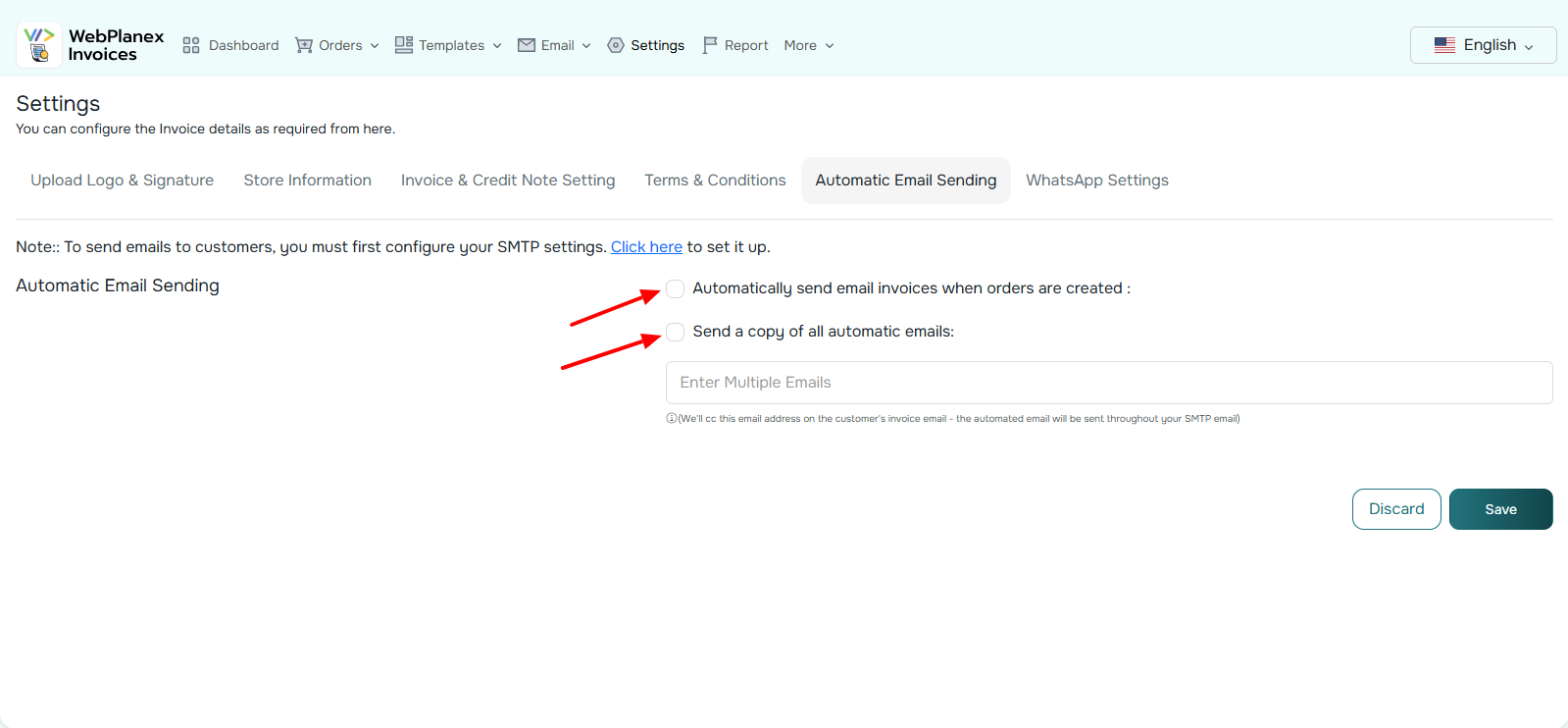
Log into your Webplanex Invoices Dashboard. Head over to Settings and find the Email Automation or Auto-Send Invoices section. They keep all the email stuff in one place, so you shouldn’t have trouble spotting it.
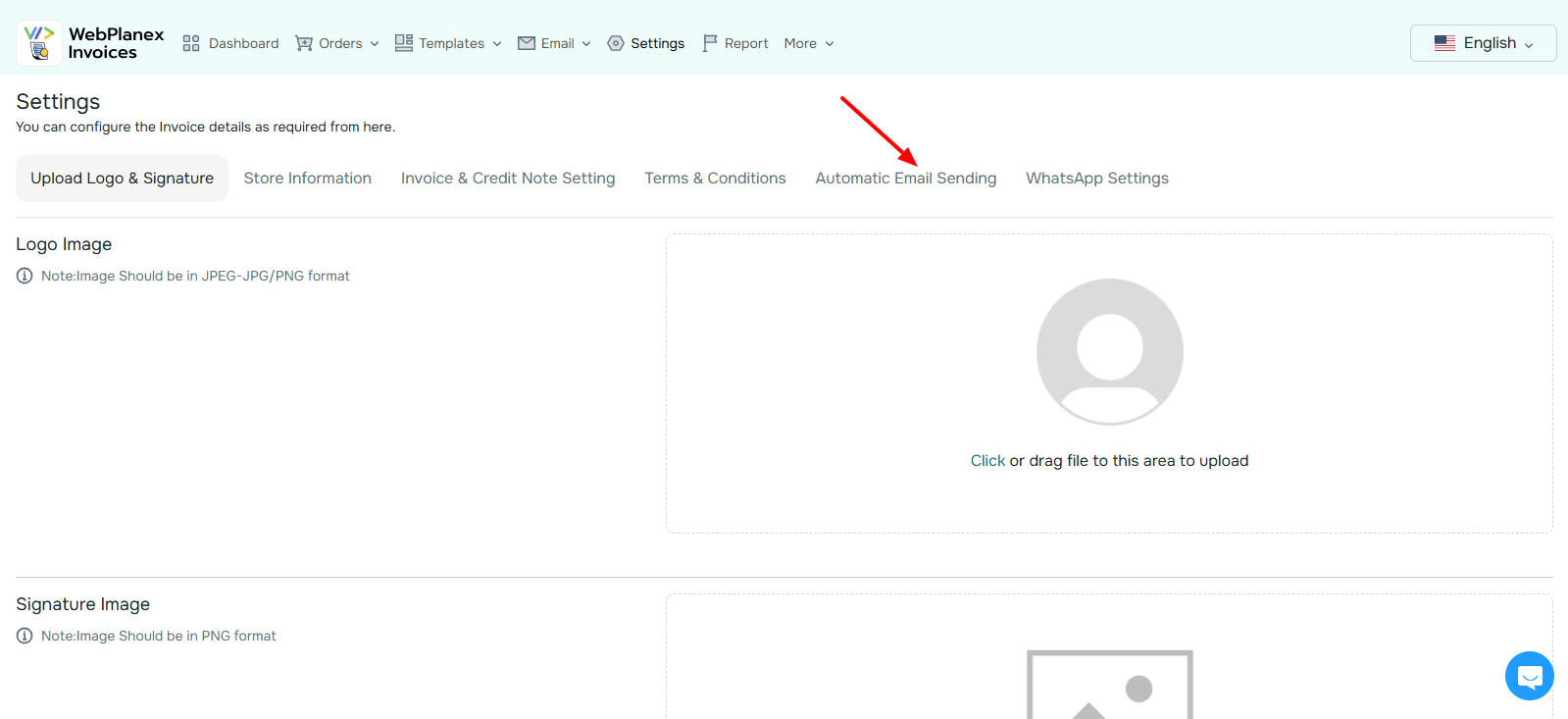
Step 2: Turn On Auto-Emailing
You’ll see a toggle for enabling automatic emails.
Once it’s switched on, a few additional options appear:
- Send invoice when order is placed
- Send invoice when payment is captured
- Send invoice on fulfillment
- Send invoice for partial payments
- Send invoice for manual orders
These conditions cover most Shopify workflows.
Pick the ones that match your process.
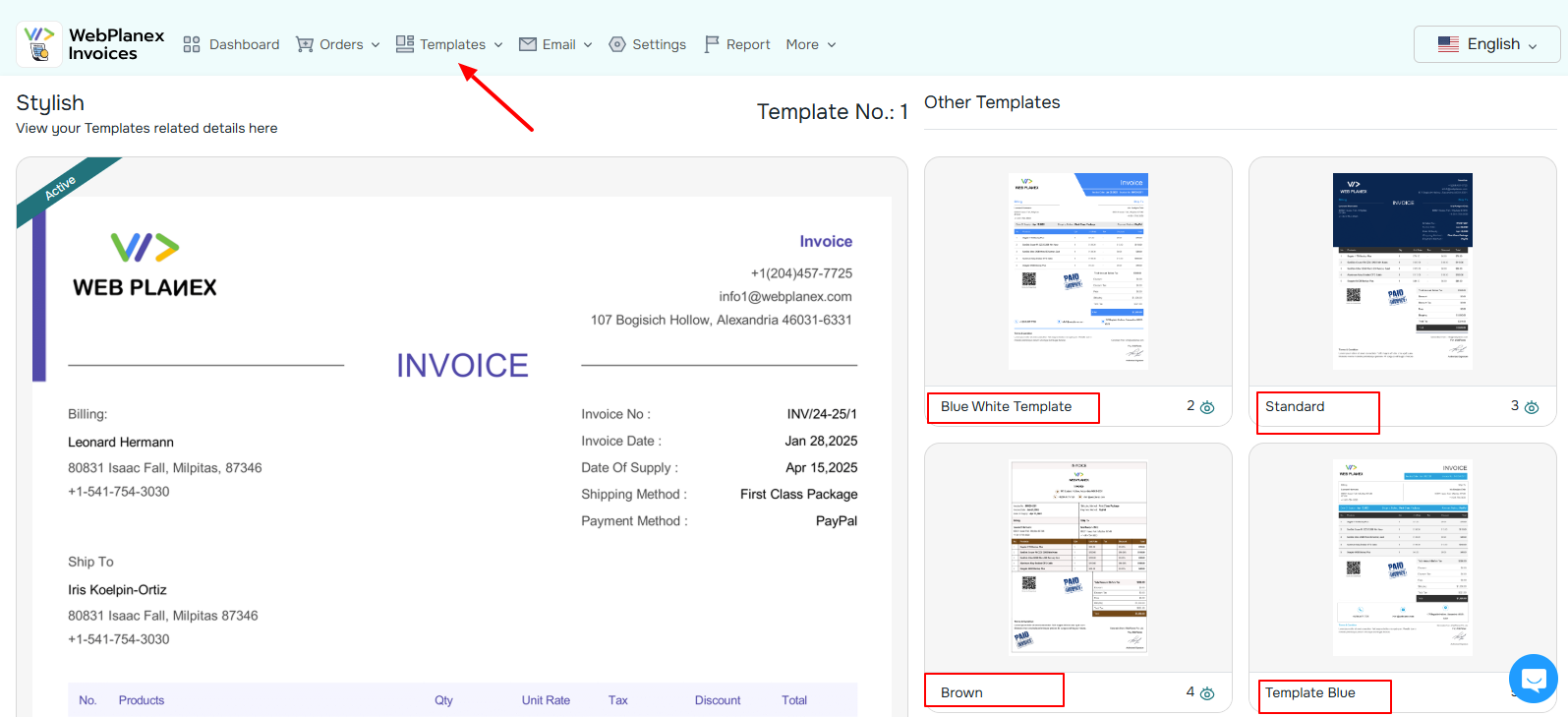
Step 3: Choose Your Invoice Template
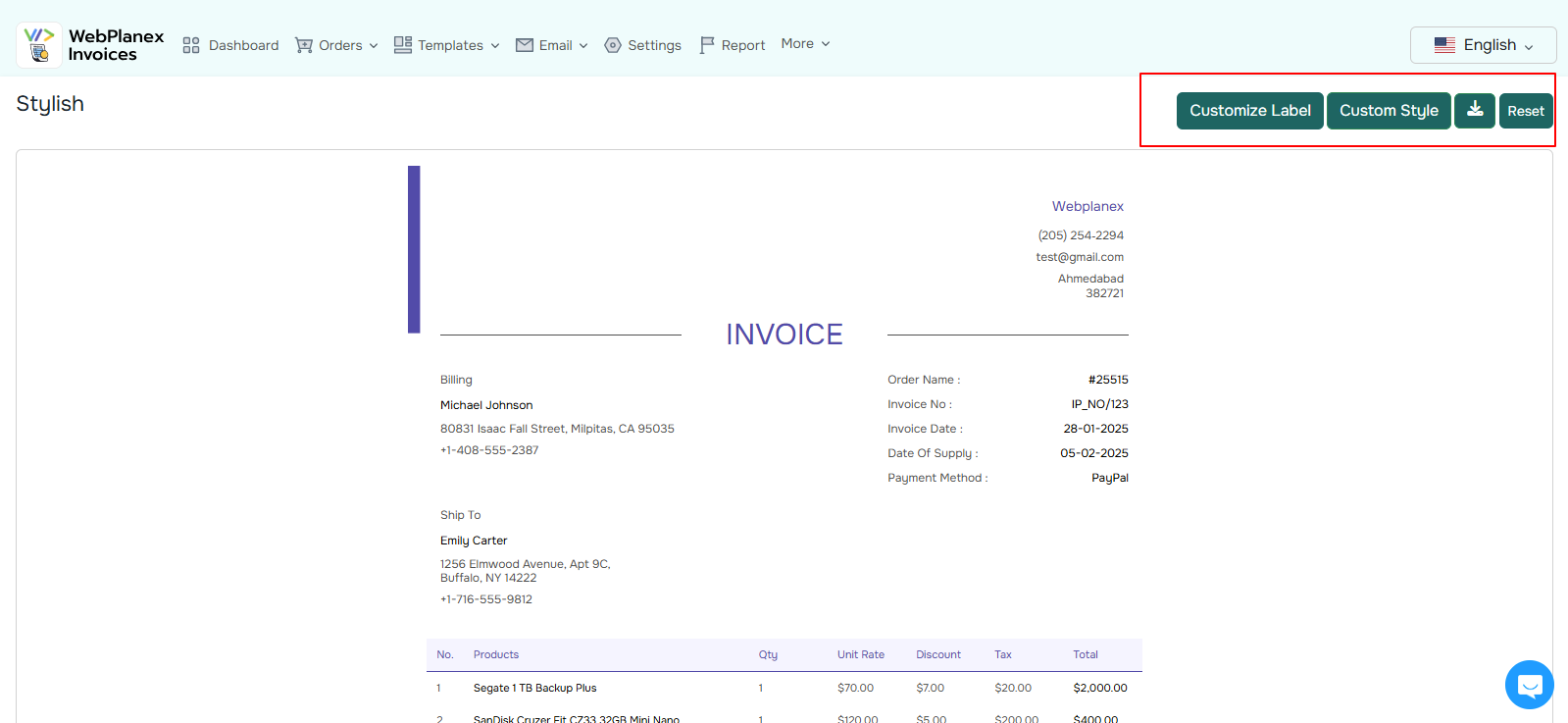
Webplanex offers multiple templates, minimalist, modern, professional, international tax versions, etc.
Choose the one that matches your branding.
You can customize:
- Colors
- Logo placement
- Header/footer style
- Customer details
- Product layout
- Tax fields
- Notes or return policy sections
Once saved, every auto-email uses this design.
Step 4: Customize the Email Itself
The email isn’t just an attachment, it’s a chance to communicate your brand personality.
You can edit:
- Subject line
- Greeting
- Body text
- Footer
- Language
- CTA links (track order, visit store, contact support)
Step 5: Send a Test Email
Before going live, click Send Test Email to see how everything looks in your inbox.
You’ll immediately see if the design, PDF formatting, and message tone match your expectations.
If not, you can adjust and test again, no limit.
Step 6: Save & Activate
That’s it.
Once activated, invoices start going out automatically with every qualifying order.
Now every single customer gets a professional, branded invoice, without you manually sending anything ever again.
How This Improves Customer Communication Instantly
Here’s what merchants usually notice within the first few days:
1. More clarity for customers
Invoices contain all details customers might ask about later, product info, taxes, shipping charges, payment method, order number, etc.
With everything clearly documented, there’s less confusion.
2. More transparency
When invoices arrive instantly, customers feel they are being treated honestly and professionally.
3. Fewer follow-up emails
Support teams often say auto-emails reduce repetitive inquiries dramatically. That time can be used for real issues instead of paperwork.
4. A branded experience at every touchpoint
Every email becomes a branding opportunity, consistent, clean, and reliable.
5. Faster business workflows
For stores dealing with tax and tariff rules, company buyers, or international orders, accurate invoices aren’t optional.
Auto-emails ensure compliance and minimize mistakes.
Extra Features That Make Life Easier
Webplanex Invoices includes a few thoughtful touches merchants don’t realize they need until they use them:
- Auto-sending credit notes for refunds
- Packing slip emails for warehouse teams
- Multi-language support
- Separate templates
- Automatic number sequencing
- Customer self-download links (customers can re-download anytime without contacting support)
All these reduce the back-and-forth that normally happens during order processing.
Conclusion
Invoices may not be the flashiest part of your store, but they are one of the most important parts of your customer communication. A simple automated email can instantly make your brand look more reliable, more organized, and more professional.
With Webplanex Invoices, the entire process becomes a background system, one that quietly ensures every customer gets a clean, accurate invoice without manual work on your side.
If you haven’t set up auto-emailing yet, it’s one of the quickest upgrades you can make to improve customer experience and reduce daily support tasks.